
Work order (WO): what it is and how to use it in the fleet
 Luiz Felipe 8 min read

A work order is essential for communication between a company's employees, especially regarding fleet maintenance.
Through it, the problem found on the vehicle is reported and fixed without important information being lost, as could happen if it were only reported verbally.
Preventive maintenance is essential for vehicles to run properly and should follow a planned schedule, in order to keep vehicles from being stopped and/or out of use for a long period. In fact, it is only through it that a WO, short for “Work Order”, can be generated.
There are two ways to generate a work order: on paper and through a digital system. But, before understanding more about which is the best alternative, check out:
- What a work order is;
- What a work order is for;
- Why it is important to create the WO;
- When to issue a WO;
- How to choose between a printed or digital work order;
- How to create a WO;
- What the WO must include;
- How to control WOs.
What is a work order?
A work order is a document that describes, in detail, a service that needs to be done. Therefore, everything related to the problem must be included, such as what the problem is, what service type is needed (preventive or corrective) and the precautions that must be taken during the service.
In the case of truck fleets, the work order lists errors and/or failures that were found on the vehicle while carrying out the inspection checklist.
The problems reported may be a broken headlight, a misaligned mirror, a brake defect, among other problems that must be resolved at a professional repair shop or by the fleet's mechanics.
What is a work order for in the fleet?
It serves, mainly, to improve the organization of fleet maintenance. Based on the records of problems and necessary fixes, the driver forwards the WO to the manager, who is then responsible for generating a quote for the service.
In cases where the digital WO is used, the repair shop or service providers receive the document as soon as it is completed in the system. This makes the service very fast.
Why is it important to create and use the WO?
The work order is what allows a job, whether preventive or corrective, to be started — with the guarantee that the service requested will be the one carried out. After all, it describes exactly what the problem is, indicating where it is, what caused it and what needs to be done.
Even though it is an item opened from the inspection checklist, it is so important that it is even considered one of the tools for fleet maintenance management.
It is through this document that maintenance activities can be carried out, and it is also important so that the fleet and/or maintenance manager can see the number of services performed and the reasons for them, and understand the costs being incurred at this stage.
When should a work order be issued?
It should be issued whenever a problem is found on the vehicle.
For example, if one of the vehicle's headlights is burned out, the work order will be opened. In it, you need to indicate the position of the headlight, the date of the occurrence, the reason, if any, and the person responsible for the vehicle and for the inspection carried out.
If you use manual work orders in your operation, the driver needs to fill out the checklist and hand it to the manager. The manager will be responsible for assessing the checklist and generating a work order to give to the mechanics.
Operations that have already modernized and use the digital checklist also have WOs opened automatically at the moment the inspection is being carried out. It does not even need to pass through the manager's hands before reaching the repair shop, since all the users involved receive the work order the moment it is completed.
How to create a work order?
To create a WO, you can choose between two models: manual or digital.
In the manual mode, we are talking about picking up paper and pen and writing everything down by hand. Based, of course, on the information received from the driver after carrying out the inspection checklist.
Here, you are dealing with a greater responsibility: defining which information will be included in your work order.
On the other hand, when using the digital model, all the information is predefined; it just needs to be filled in correctly, by the system, when a work order is opened.
What must a work order include?
There is some variation in which information needs to be in a work order, with each company defining what makes the most sense for its type of operation. In some situations, a technical report may be required, for example, or a warranty statement.
Even so, there is information that must appear on every single WO:
- Company name;
- Address and contact information;
- Name of the service provider;
- Request date;
- Description of the problem;
- Activities to be carried out;
- Notes;
- Date the services were carried out;
- Signature of the service provider and the client company.
Work order example
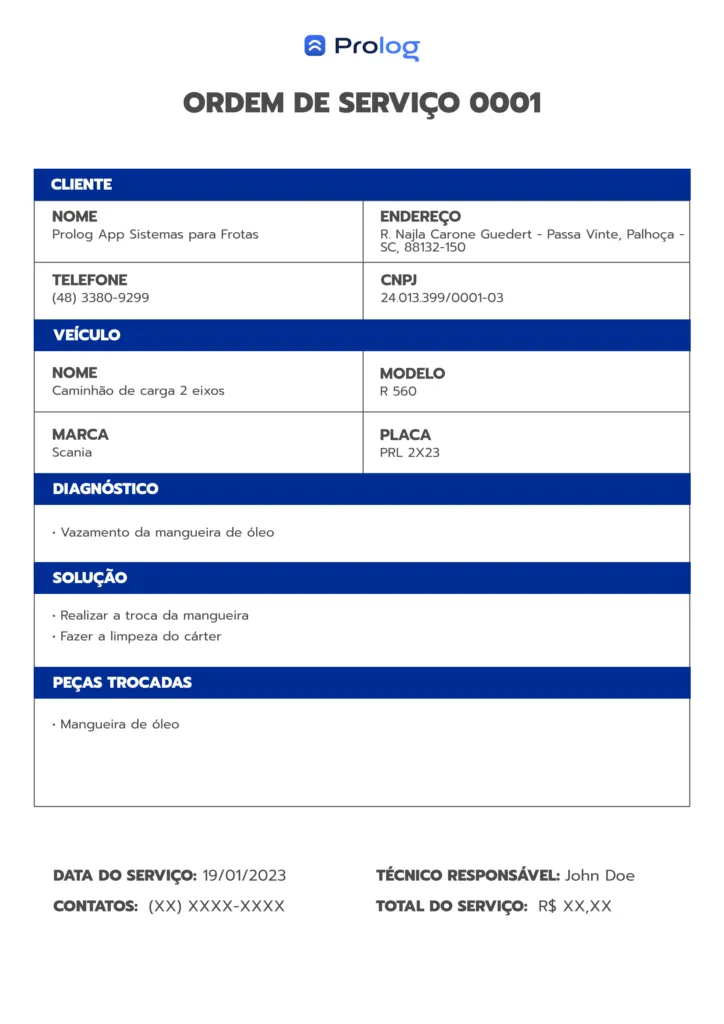
Work order example.
How to choose between a printed or digital work order?
Remember that each of the alternatives is linked to the maintenance checklist. That is, if you use a printed checklist, the WO will be printed; if you use the electronic one, the WO will be digital.
So, what is the main difference between them?

Creating a digital and a manual work order.
A paper work order needs to be created in a document on the computer and printed to be used. It also requires the information to be passed “from hand to hand” until the problem is fixed.
If the fleet has a step for building a maintenance history, the service also needs to be recorded so the data can be analyzed later. In this case, you will probably need to transfer the information to a spreadsheet, which means yet another manual, error-prone note-taking process.
On the other hand, the digital WO does not need all this additional effort. As soon as the inspection of the vehicle is completed, the WO is automatically opened and the mechanic responsible has immediate access to it, without needing to contact other employees.
The history is also available automatically; just go to the system and select the filter you want to find the work order you are looking for.
What to consider when choosing between the types of WO?
With the printed work order, there is a greater expense on paper and even on printing ink. The time spent filling out and detailing the services is longer than with a digital system.
In many cases, the information needs to be transferred to a computer system anyway. So why not invest in an electronic checklist system that generates a digital work order?
Thanks to its speed and objectivity, it also brings other benefits:
- Reduced spending on service delivery;
- Elimination of notepads and clipboards;
- Ease of adding, removing or changing information in the system;
- Sustainability;
- Easy and fast access to any information within the system;
- Increased productivity;
- Lower error rate;
- Reliability of the information provided;
- Real-time data and updates, recorded with each inspection and work order;
- Data for analyzing vehicles, drivers, maintenance and services performed.
How to control work orders?
To achieve greater productivity and organization in work order control, there is no other way: you need the help of logistics technology. A checklist system, as we have mentioned, handles both the management of inspections and of the WOs carried out.
In fleets where paper still predominates, some organization tips start with filing documents by categories such as how critical the problem is and the expense involved. For completed orders, it is best to have a view by service closing date.
Prolog App electronic checklist system
The Prolog App system has existed since 2016 and has been developing and improving ever since. We already serve more than 1,500 operations and, in 2022 alone, more than 2 million checklists were carried out on our platform.
Of these, you can be sure, many generated work orders!
When the driver carrying out the vehicle inspection finds a problem, the driver reports it within our system and opens a work order. In it, the driver describes the problem found and attaches a photo of the defect.
In fact, up to 10 files can be added, if necessary, such as quotes, expense reports and so on.
Once everything is set up, the driver confirms and provides an electronic signature identifying the driver responsible for the checklist and for opening the work order, and then the order stays open in the system until the person responsible for the fix does their job.
Even after the service is completed, the order remains saved in the system, but now classified as closed.
This way, you generate productivity, efficiency and savings in fleet management! Want to get to know our system? Schedule a conversation with our specialists.
Frequently asked questions
What is a work order?
When should a work order be issued?
What must a work order include?
What is the difference between a paper and a digital work order?
How does Prolog App handle work orders in the checklist?
// newsletter
Fleet management content, straight to your inbox
Articles on tires, maintenance and fleet operations. No spam.


