Truck checklist app: Prolog features
 Luiz Felipe 6 min read

With a truck checklist app, you bring results to your fleet quickly, in an organized way that is easier to keep track of.
If you already use a control spreadsheet, you can appreciate how dedicated management makes all the difference in meeting fleet objectives and goals. But with a digital system, processes are even better, because inspection no longer depends on paper and starts generating standardized records by phone.
Read on:
- What a truck checklist app is;
- What the checklist app is for;
- The benefits of using a checklist app in your fleet;
- Truck checklist app features (that paper does not have);
- How to create a truck inspection checklist;
- What the inspection checklist must include.
What is a truck checklist app?

This technology helps with fleet vehicle inspection — trucks, in this case.
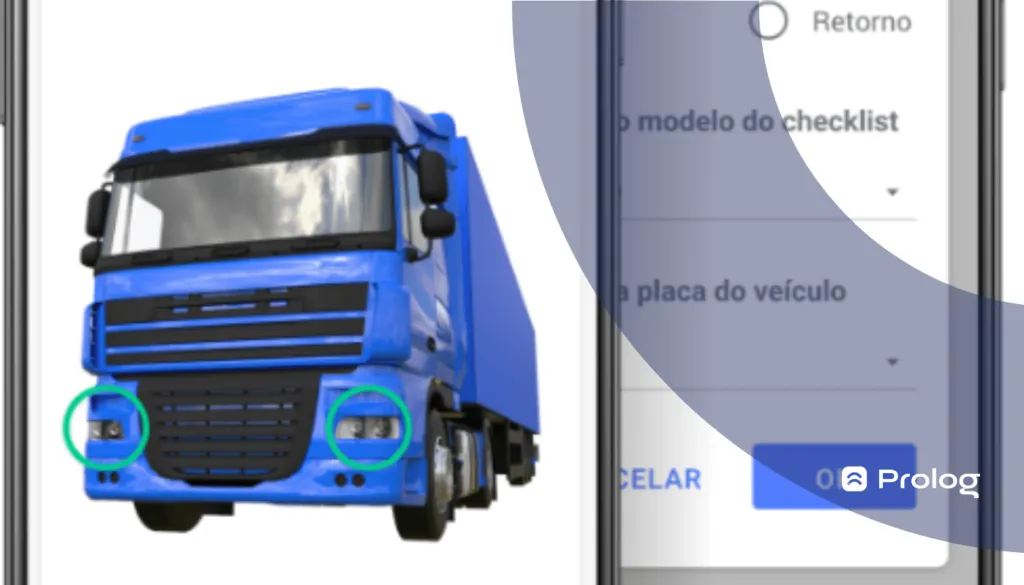
In the app, you create the list of items that must be checked and, when it is opened on a phone to perform the task, you simply tap “OK” (green, indicating everything is fine) or “NOK” (red, indicating a problem with the item).
What is the checklist app for?
It replaces the traditional paper checklist, bringing greater speed and productivity to routine fleet vehicle inspections.
It is also a tool that helps you better understand fleet vehicles and their performance. This enables better maintenance planning and lower operating costs.
With Prolog, digital inspections are completed by phone and can automatically open work orders from reported nonconformities, helping connect the driver’s check to the workshop routine.
What are the benefits of using a truck checklist app?
The benefits of a truck checklist app are:
- Faster vehicle inspections;
- Greater productivity in data collection and analysis;
- Vehicle performance information;
- Lower operating costs;
- A source of knowledge for planning maintenance and the inspection schedule;
- Understanding a vehicle’s average useful life.
Although some of these can also be considered benefits of using paper checklists in the operation, there are some distinctive app features you should know about. Read on:
Truck checklist app features (that paper does not have)

Adding photos
Photos are very valuable for mechanics to quickly identify a vehicle’s problem. Even when there is a NOK (not OK) item and a description, a photo makes it much easier to understand what the driver reported in the digital vehicle inspection.
This feature remains one of the most practical aspects of the electronic checklist: in Prolog, you can include photos taken during the inspection to help describe reported nonconformities.
This gives the workshop team more context about what was found, without relying only on a short note or a description written after the check.
Usability
A paper checklist occupies both hands and, in most cases, is not organized with practicality in mind.
It is usually created in alphabetical order instead of an order that makes sense for the inspection, which can make drivers walk around the vehicle several times, adding several minutes to inspection time.
It also takes longer because drivers have to stop to rest the clipboard on something and write before moving to the next item.
In many cases, this becomes such a big problem that drivers simply do not perform the inspection and hand the manager a blank checklist.
But when it is performed, even if the difference is only a few minutes, total inspection time by the end of the month can add up to several hours that could be saved.
A digital checklist, on the other hand, offers excellent usability. Drivers can easily check items with just one hand while marking OK or NOK with the other.
The app even allows customized questionnaires for each occasion and/or vehicle. So you can have a departure check, a return check, a headlight check or a complete check.
You decide according to your fleet’s needs!
Productivity
All the points mentioned under usability also apply to productivity. When we talk about wasted time, we are also referring to lower productivity.
Besides making the process faster and more practical, the digital system keeps a history of the time taken to complete each checklist, as well as the average repair time for each work order opened during an inspection.
So you can have very clear control over the team’s productivity in these areas.
However, it is not just a question of the inspection time each driver spends, but also how much vehicle checks affect the productivity of the fleet as a whole.
In other words, when a vehicle has problems, it does not perform well and can even cause losses for the operation.
For example, suspension, balancing or alignment problems cause higher fuel consumption.
Headlight problems, meanwhile, increase road risks and can lead to fines for the fleet — as well as the vehicle being detained until the situation is resolved.
Automated analysis
A real advantage for managers is not having to scrutinize ALL the data to find the most relevant information. That is why one of the biggest distinguishing features of a truck checklist app is precisely the automation of analysis.
The logistics checklist is developed to save and process inspections, organizing them into several reports. Managers therefore only need to find the report best suited to what they want to understand.
Here are some examples:
- Work order breakdowns;
- Number of NOK items;
- Checklist completion time per employee;
- Average repairs per vehicle.
Electronic signature
In many cases, drivers forget to fill in their name on the checklist or simply do not pay enough attention to it. Sometimes, they may be afraid to identify themselves and show that they caused damage to the vehicle they were responsible for.
When using the truck checklist app, this no longer happens. Drivers need to have their signature registered and must include it in the system whenever they complete a checklist.
Control in the palm of your hand
Have you ever wondered how to complete fleet checklists by phone? That is what you get when you choose to implement a digital platform in your company.
Full control of your fleet’s inspections, reported findings and reports is in the palm of your hand, accessible by phone even when you are not at the operations office.
How do you create a truck inspection checklist?
When you know fleet vehicles and the average time before each component tends to develop problems, you can calculate an expected time to check these items before they fail.
Also, to create inspection lists after acquiring a checklist app, you should think about which checklist templates your fleet needs.
What must the inspection checklist include?
It depends on the checklist type you are completing, but some of the most important items are:
Daily checklist
- Headlights;
- Visible tire cuts or punctures;
- Brakes;
- Horn;
- Fuel level;
- Seat belt;
- Hazard lights;
- Speedometer and tachograph;
- Oil leaks.
Two-week checklist
- Tire and spare tire calibration;
- Radiator water level;
- Windshield washer water level;
- Gasoline reservoir level;
- Vehicle lights, interior and exterior;
- Engine oil level.
Six-month checklist
- Brake pads;
- Parking brake adjustment;
- Full engine oil and oil filter change;
- Alignment and balancing;
- Suspension and wheel bearings;
- Wiper blade replacement (front and rear).
Learn in more detail how a truck checklist app works through a free Prolog App demonstration — schedule yours now.
Frequently asked questions
What is a truck checklist app?
What are the benefits of using a checklist app in a fleet?
What features does the checklist app have that paper does not?
What problems do paper checklists cause during inspection?
What must a truck checklist include?
How do you create a truck inspection checklist?
// newsletter
Fleet management content, straight to your inbox
Articles on tires, maintenance and fleet operations. No spam.