Fleet checklist software: 5 criteria for choosing
 Jean Zart 11 min read

Implementing checklist software may seem excessive to people used to paper, but it solves what paper and spreadsheets cannot. As the number of vehicles grows, it becomes hard to keep everything under control without delays, lost information or relying on luck to avoid missing a critical fault.
Paper checklists do not provide a reliable history, generate alerts or communicate with the maintenance team. In contrast, an electronic checklist allows everything to be recorded with a photo, the inspection's geolocation, time and the responsible person's signature — and it can even generate automatic work orders when a nonconformity is reported. That is why more and more transport companies are moving to a digital solution.
In this article, you will learn how to choose the best checklist software for your fleet, what to consider before adopting one and why to choose a solution designed specifically for freight transport. Ready to simplify your management?
- Why use fleet checklist software?
- What real impact can an electronic checklist have on your fleet?
- What is the best checklist software for your operation?
- How do you implement checklist software in your fleet?
- 5 advantages of Prolog's Electronic Checklist solution
Why use fleet checklist software?
If you still use pen and paper for vehicle checklists, you know how time-consuming it is, how it leaves room for errors and how it makes any form of control difficult. And as the fleet grows, this inefficiency becomes a real problem: a lack of reliable data, rework, vehicles operating with faults and, of course, losses.
Beyond operational control, there is a basic responsibility before putting a vehicle on the road: in Brazil, the driver must check that mandatory equipment is present and in good working order. Without a standard, a reliable history and a clear workflow for handling nonconformities, it becomes harder to prove that the inspection took place and quickly refer anything needing maintenance.
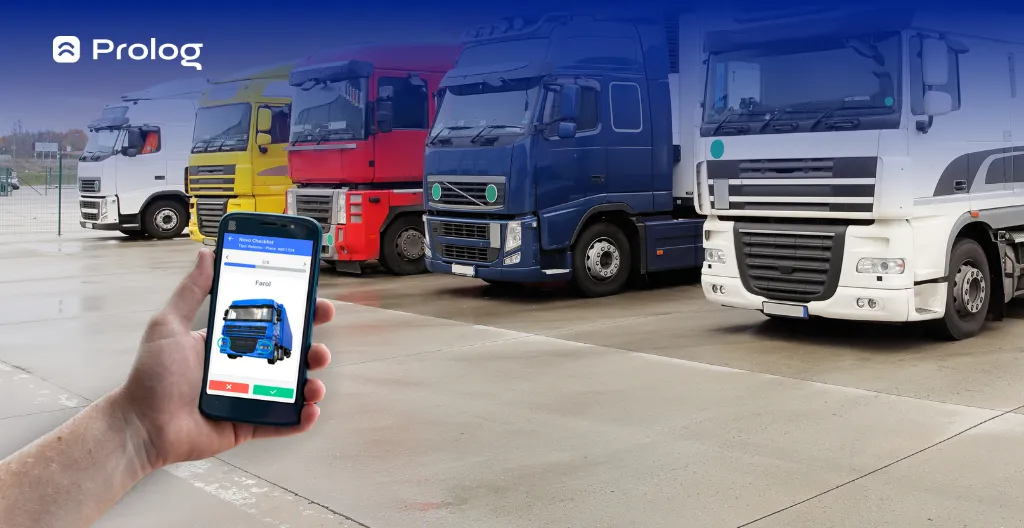
This is exactly where checklist software makes a difference. It digitizes and organizes this essential operational step. With a few taps on a phone, you standardize the process, speed up inspections, store data in one place and access everything quickly.
It is worth emphasizing that there is no difference between an electronic checklist and a digital checklist: both terms are synonyms and offer all the benefits software should provide: simpler vehicle inspections, greater vehicle maintenance management efficiency, data storage and, above all, an easier routine for operational employees.
What real impact can an electronic checklist have on your fleet?
Make no mistake: adopting checklist software goes far beyond abandoning paper. It is a change that reaches the foundations of the operation — from how you inspect vehicles to how you identify faults, make decisions and strengthen the fleet's overall safety.
In practice, the electronic checklist transforms the routine of drivers, maintenance teams and managers themselves. It helps reduce the chance of vehicles with problems continuing without action being taken, organizes information flows, reduces rework and improves communication between departments. All with precise data, standardization and control in the palm of your hand.
When used frequently and strategically, results tend to appear in areas such as:
- Fewer mechanical faults and avoidable breakdowns
- Less rework and lower corrective maintenance costs
- Detailed records for audits and regulatory inspections
- Faster decisions based on reliable data
- Vehicles ready more quickly and safely (fewer unexpected stops)
There is more: when the checklist integrates with maintenance management, each failed item can automatically generate a work order. In other words, the detected problem becomes action — without relying on paper passing from hand to hand.
A good example is Rodalog, a Prolog customer since 2018. With the Electronic Checklist solution, the transport company has already completed more than 230 thousand checklists. The company has also registered 618 vehicles in the system and integrated checklist data with maintenance and tire management, making the operation much more efficient and reliable.
This kind of result is only possible when control is taken seriously — with support from technology designed for the realities of transport.
What is the best checklist software for your operation?
Stating which checklist software is best for your operation is a delicate matter, because the truth is: it depends on your company's circumstances and current goals. But here is an early pointer — if your operation focuses on freight transport, the choice must go beyond simply “making the checklist work”.
You need a tool with features specific to the routine of a heavy-duty fleet, in other words, a truck checklist. With that in mind, here are the main factors to analyze before choosing a solution:
Customizable checklist
Each vehicle type requires a different inspection. Good checklist software should allow you to create customized forms that adapt to the fleet type, vehicle type or operational context.
It is also essential for the system to allow mandatory fields, photos taken during the inspection and even conditional rules, such as displaying new questions based on specific answers. This level of detail encourages more complete inspections and reduces uncertainty or omissions when completing forms.
Easy access and offline mode
People on the operational front line do not always have internet access during an inspection — especially in remote yards, industrial areas or regions with an unstable signal.
That is why it is essential for the software to work offline, automatically synchronizing data as soon as the connection is restored. This avoids gaps in records and gives drivers and inspectors greater autonomy.
Cloud storage and data security
When checklists are completed on paper or in local spreadsheets, data is at risk of being lost — and the history becomes inaccessible.
With checklist software that saves everything in the cloud, you ensure secure, centralized records accessible at any time. This is essential for audits, maintenance processes or even proving that a particular vehicle was properly inspected before a trip.
Updated fleet overview (checklist traffic light)
It is essential to know which vehicles are ready for the road and which need attention. That is why solutions such as Prolog's Checklist Traffic Light stand out: with each recorded checklist, the manager sees fleet status based on completed inspections and can act quickly.
This feature helps prevent vehicles with faults from being cleared without action being taken — while also optimizing the use of those with everything in order.
Integration with the maintenance system
A major advantage is being able to integrate the electronic checklist with the fleet's maintenance system. This means that whenever an item fails an inspection, a work order is generated automatically.
This kind of integration saves time, improves communication between departments and prevents important information from being lost along the way. The result? Faster fault correction and fewer vehicles unexpectedly out of service.
How do you implement checklist software in your fleet?
When implementation is strategic, results appear quickly: faster inspections, fewer recording errors and data-based decisions.
Here is a practical step-by-step guide to implementing checklist software in your fleet:
Research and choose a reliable company
Before any implementation, the first step is to find a specialized company that truly understands freight transport. The market offers many options, but few are actually designed for people managing heavy-duty fleets — with specific needs, deadline pressures and everyday operational logistics.
Prolog, for example, works exclusively with fleet solutions. The service process is attentive from the start: before any demonstration, you go through a quick initial assessment and speak directly with a team specialist. The goal is to understand your operational situation, identify the main bottlenecks and show how technology can help from the very first use.
Engage the team from the start
No tool works on its own — and team adoption makes all the difference to a successful implementation. Explain to drivers, mechanics, yard leaders and inspectors why the change is happening and how the system will make their daily work easier.
Use practical examples to show how completing forms digitally saves time, avoids rework and protects both the employee and the company. When the team understands the tool's value, engagement comes naturally.
Test and adjust
Implement the system with a pilot group or part of the fleet and use the first few days as a test. This allows you to identify possible adjustments to forms, completion logic or even team training.
This testing phase helps create a more solid process to scale later, while avoiding freezes or uncertainties that could hinder adoption.
Integrate with the maintenance system
The true power of an electronic checklist emerges when it connects to maintenance. Then, whenever an item fails, the system can automatically generate a work order — without relying on paperwork or someone's willingness to pass on the information.
This integration prevents bottlenecks, reduces response times and ensures corrective actions happen quickly and in an organized way.
Monitor results
After implementation, it is time to keep track of indicators. How many checklists are completed per day? Which items fail most often? How many critical nonconformities were reported in inspections?
This information is valuable for improving the process, identifying failure patterns and making decisions based on data — rather than guesswork. And do not worry about analyzing this data manually: good software offers practical visual reports that help you gain control of the operation faster and with greater confidence.
5 advantages of Prolog's Electronic Checklist solution
Now that you understand why checklist software is essential for efficient fleet management, you may be wondering: why choose Prolog's solution?
Below are 5 real advantages of the tool — based on product features and results from people who have already implemented Prolog:
1. Add photos and documents to WOs
With Prolog, you can attach up to 10 files directly to work orders generated from the checklist. This allows you to include invoices, photos, parts quotations and other essential documents — all centralized and available in a few clicks.
This feature brings greater transparency to management, facilitates audits and speeds up decisions about maintenance and clearing vehicles for use.
2. Flexible technical support
At Prolog, you are never left in the dark. Our support is provided by specialists who speak the language of fleets and closely support each stage of your operation. Whether for technical adjustments, specific questions or new settings, you will always have a team ready to help.
It is no coincidence that customers such as Marbela, an Ambev distributor in Rio de Janeiro, report that the Prolog team's support was one of the most important factors in successfully implementing and adopting the system.
“Prolog made our lives much easier in 3 areas. Productivity, efficient control and cost reduction!” – Paulo Rocha, Fleet Manager.
3. Reports and indicators ready to support decisions
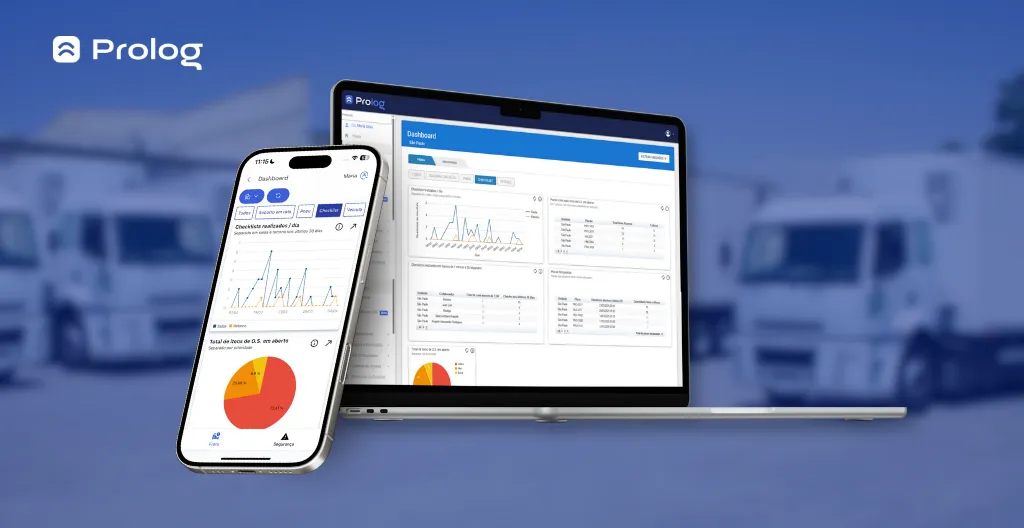
With Prolog's checklist, you do not need to build charts in spreadsheets or hunt for data across several tools. The system offers automatic reports with key information such as:
- Number of work orders generated
- Open or completed WOs
- Items with the highest number of occurrences
- Average WO resolution time
- Average maintenance team productivity
This information helps managers act faster, make decisions based on real data and identify bottlenecks before they become bigger problems.
A clear example is Klabin, Brazil's largest paper producer. After implementing Prolog's Electronic Checklist, the company resolved more than 3.2 thousand work orders and completed more than 22 thousand checklists.
4. Integration with the systems you already use
Prolog's technology was built to connect with your reality. With integration APIs, you can synchronize the main features with the management system your company already uses — such as BI tools, ERPs and platforms like Qlik, Totvs, Praxio and Power BI.
This ensures a smooth flow, prevents rework and keeps all fleet information connected in a single ecosystem.
5. A solution built for freight transport
Beyond all this, Prolog's Electronic Checklist was developed exclusively for freight transport. Among the features customers value most are the benefits already mentioned throughout this article, such as:
- Offline operation with automatic synchronization
- Full form customization, with photos and answer logic
- A clear fleet overview with the Checklist Traffic Light
- Integration with maintenance management
The truth is that good checklist software does not solve everything on its own — but it helps turn inspection records into action, operational visibility and the confidence to grow with structure.
While some managers still lose time with spreadsheets, paper and unreliable controls, you can get ahead with technology that is easy to use, efficient and designed for freight transport.
With Prolog, the checklist stops being a bureaucratic task and becomes a strategic ally for reducing costs, increasing fleet safety and making your management more professional.
So, is your operation ready to take this next step?
Book a free demonstration now and see how Prolog's Electronic Checklist can transform your operation — from the yard to decision-making.
Frequently asked questions
Why replace paper checklists with software?
What is the difference between an electronic checklist and a digital checklist?
What should you evaluate before choosing checklist software?
How do you implement the software in your fleet?
What results have customers reported with Prolog's Electronic Checklist?
Does the software integrate with the systems the company already uses?
// newsletter
Fleet management content, straight to your inbox
Articles on tires, maintenance and fleet operations. No spam.